
Bring WooCommerce to the real world
With JQBiz you turn your WooCommerce into a unified system: control the stock of all your stores with a professional point of sale and boost your team’s productivity, both at the counter and in the warehouse.
Manage physical and online stores
from a single system,
with all the power of WooCommerce.


Looking for a plugin to optimize your WooCommerce?
This is your story. Take control of your business.

You have an online store and want to open a physical shop
🧍♀️ You sell online, things are going well… and now you want to open a store. But you worry about losing stock control: “What if I sell in store something that was already sold online?”
With JQBiz you connect WooCommerce with your physical point of sale. Everything stays synchronized: products, stock, cash register, and orders.
You have a physical shop and want to sell online
🧍 You’ve been selling in your shop for years, face to face. But now your customers want to buy online.
With JQBiz your physical catalog stays synced with WooCommerce. You keep working as usual, but now you also sell online.
You are starting from scratch
💡You’re starting out and don’t know where to begin: website or physical store?
With JQBiz you can sell from day one — at trade fairs, markets, or pop-ups — using WooCommerce and a barcode scanner. When it’s time to open a store, everything is already connected.
A complete solution to sell more and manage better
Our suite comes from real shop experience that needed more than WooCommerce offers by default. We build plugins that connect sales, inventory, and day-to-day operations—without technical headaches or hidden costs.

Professional physical point of sale
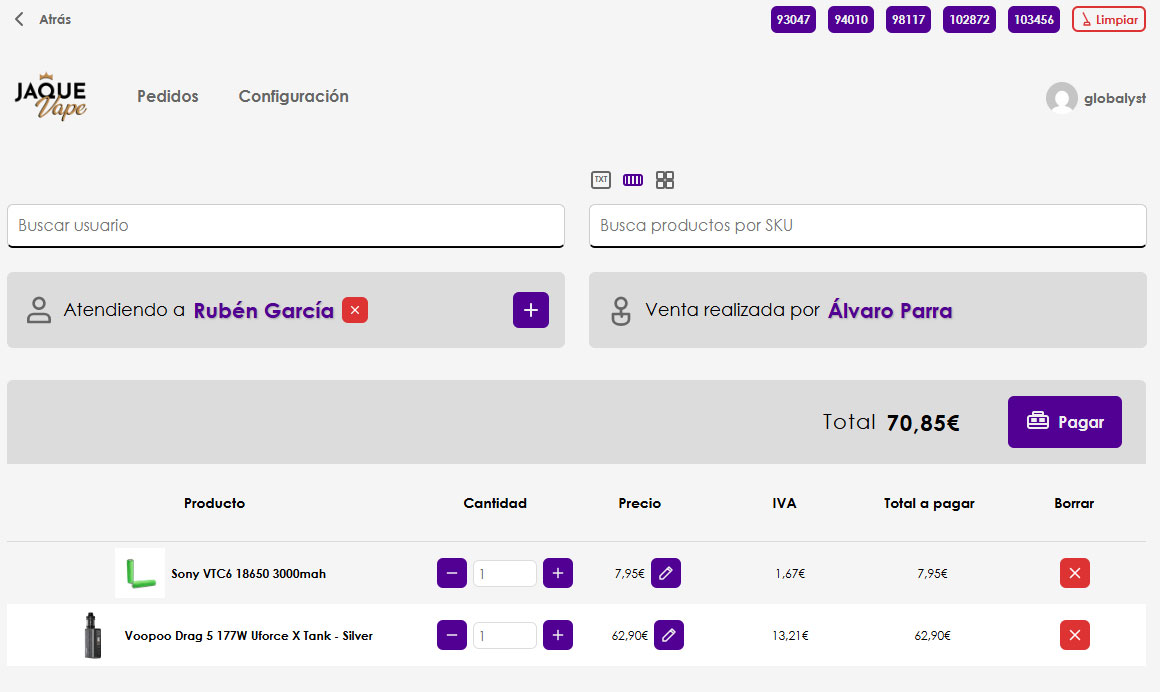
Turn any browser into a cash register. Our POS plugin is designed for shops that want to centralize operations, record in‑person sales, print receipts, and control cash flow without relying on external systems.
- 💰 Full cash control.
- 🔍 Search by name, category, or code.
- 🧾 WooCommerce orders from the counter.
- 👥 Record staff actions, email reports.
- 🔗 Everything synchronized: products, warehouses, and users.

Inventory without chaos
This allows a brand that sells online to have several warehouses or shops managing their stock separately, while all work on the products of a WooCommerce store, showing the summed stock across all locations.
- 📦 Inventory by location: shop, warehouse, online.
- 🔁 Fast restocking by scanner or date.
- ✏️ Bulk changes in seconds.
- 🧩 Variations as easy as simple products.
- ⏱️ Save time every week.
Real operational power
-
✅
Fewer stock errors No duplicates or loose spreadsheets
-
⚡
Faster cash closing Guided, unified process
-
🧭
Clearer operations Roles, logs, and traceability
- Multi‑warehouse inventory
- Touch POS and scanner
- Receipts and reports
- Users and permissions
- Fast restocking
- Simple variations
- Own API
- Logs and auditing
“Now everything is synchronized. We no longer check anything by hand.”
*Indicative values from real deployments. Adjust to your case.
What if you could have full control starting today?
- 🔒 No per‑user fees
- 📦 No complex migrations
- 🛠️ 100% compatible with WooCommerce
Try the live demo and, if it fits, buy with one click.
Demo with no installation. Initial support included. Questions answered live.
Do I need extra plugins?
No. JQBiz includes Point of Sale and Warehouse, with the required core. It runs on standard WooCommerce.
Is it compatible with my WooCommerce theme?
JQBiz provides its own interface, independent from your WooCommerce theme.
Can I place orders in my physical shop and have stock synchronized with my online store?
Yes. POS sales immediately reduce stock on the website, and vice versa.
Can I have more than one physical shop and still keep stock synchronized?
JQBiz manages multiple shops with separate inventories and unified online sales.
Can I restock the shop using a barcode scanner?
Yes. Scanner‑based restocking speeds up inventory updates.
Can I receive daily reports for each shop’s cash registers?
Yes. You’ll receive daily email reports: cash management, sales, and seller information.
Can I track what happened at the cash registers?
JQBiz includes an advanced log to track staff actions at the register and in the warehouse.
Can I get printable purchase receipts?
Yes. After each order, a printable receipt is generated and can be retrieved later.
Can I associate in‑store orders with WordPress users?
Yes. Website and registers share users; you can assign the order to the customer during the sale.
Can I update product stock and price quickly and intuitively?
In Warehouse you can search and modify inventory and prices on a single screen.
Can I customize JQBiz to match my brand?
Yes. Customize logo and colors in the app and on the receipt.
Can I get a list of all products sold within a date range?
Yes. Generate the list by period and restock everything with one click.
Can I search products by barcode?
Yes. The POS includes a SKU search, compatible with barcode scanners.
👉 Live demo. No installation. No commitment.
